How to Build an Interactive Cursor-Tracking Website with AI
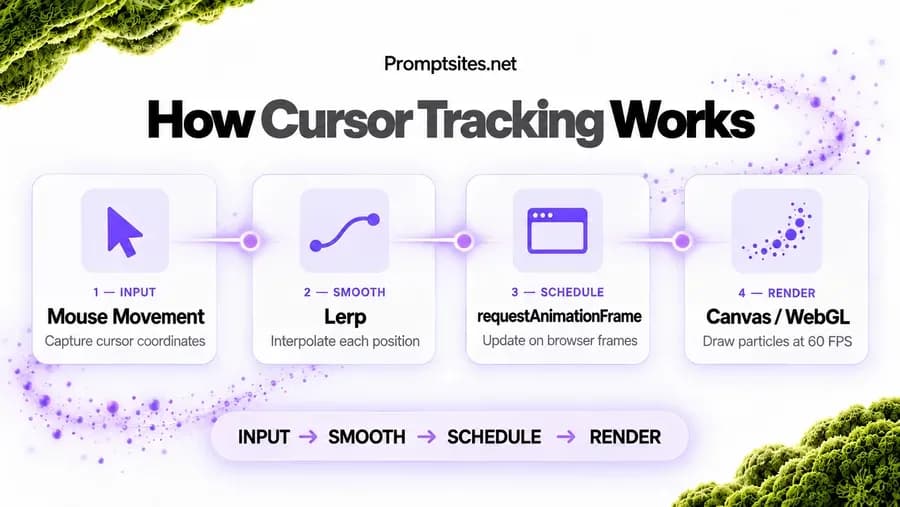
Cursor trails, 3D tilt and magnetic hover used to need a specialist team. Here is the prompt pipeline that produces them, and the checklist that keeps them at 60 FPS.
Introduction: The Evolution of Interactive Web Design
Users have become accustomed to interactive elements in websites and applications. Making use of various WebGL and 3D interactions has become an efficient way to lower bounce rates and increase average session duration. Not long ago, implementing such interactions would require months of work of a team of experts consisting of a web developer, graphic designer, animator, mathematician, and a programmer. A good knowledge of JavaScript, webGL, and GLSL would be a must. Now, with the help of generative and custom AIs, developers can create such elements within hours. Further, such elements can be modified and parametrically adjustable to best fit the end-user experience.
Step 1: Choosing the Right AI Prompts for Cursor Effects
Writing good prompts is crucial to designing compelling interactive applications. Below are a few prompts that illustrate the types of effects you can create when using an AI like Claude or ChatGPT to generate code snippets.
- For a 3D card effect, prompt the AI to generate code to create a div that uses ThreeJS to render elements that are tilted based on the relative position of the user's cursor, similar to this code example.
- For a fluid or particle cursor trail effect, prompt the AI to create WebGL code that uses a shader to render particles or fluid that are rendered based on the position of the user's cursor, similar to this code example.
- Prompt the AI to create code to define a class that creates a property that pulls elements near the cursor, similar to this CSS example.
When defining classes, use the AI to generate code that utilizes lerp for element positioning to create smoother element transitions rather than abruptly updating element positions.
Step 2: Generating Code & 3D Assets with AI (Copy-Paste Prompt)
Creating a cursor tracking website using AI-powered technology involves visual generation, automated coding, and framework incorporation. To improve the efficiency of your interactions with your LLM, use the following system prompt in your next project.
As a Senior WebGL Developer, I will code a JavaScript solution using HTML5
canvas to create a cursor trail with particle effects. There are a few
requirements for this effect. First, the trail must use lerp to smooth the
mouse coordinates. Second, the trail should have a fade effect. Lastly, the
animation should be in a requestAnimationFrame callback and the application
should aim for a 60fps frame rate. Inline comments in the code should be used
to adjust the trail effects and colors.
After you have generated the code, copy and paste it into the project. This code can be used in React, Next.js and vanilla HTML/CSS projects.
Step 3: Performance & Mobile Optimization Checklist
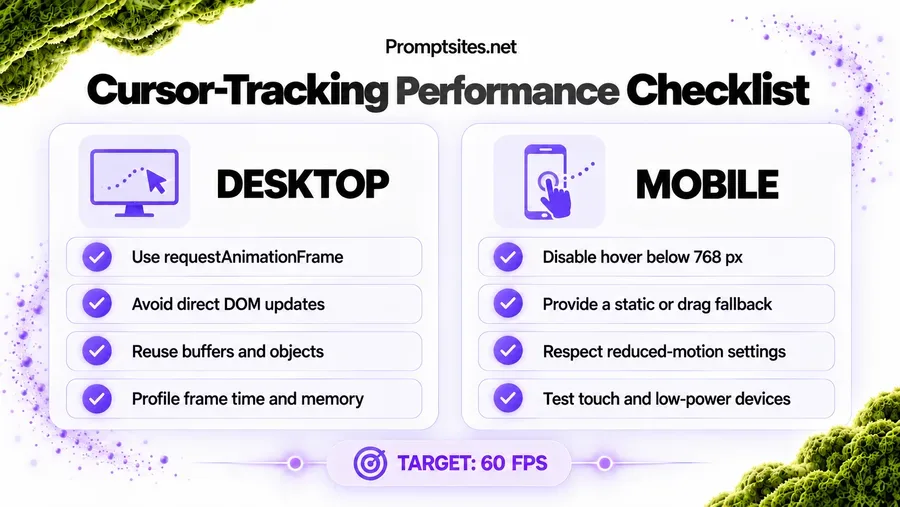
Relying too heavily on event listeners (mousemove) can significantly impact performance. To avoid high cpu usage and stutters, requestAnimationFrame should be used instead, and mouse positions should not be updated directly on the DOM.
Updates should be scheduled on the browser's animation frames. Setting up a user agent string to detect touchscreens and disabling cursor tracking on those should be considered. Since there are no hover states on touchscreens, the AI should default to a static layout or allow dragging to move elements on the screen if the viewport width is less than 768.
Since WebGL can encounter frame drops, memory leaks and garbage collection issues, the AI should additionally be given a prompt to optimize the code for those issues as well.
Overview: Cursor-Tracking Implementation Framework
| Stage | Tech Stack / Tool | Key AI Prompt Focus | Expected Output |
|---|---|---|---|
| 1. Design & Concept | Midjourney / Spline AI | 3D interactive hero section, cursor reaction, futuristic UI | Visual concept & 3D scene |
| 2. Code Generation | Claude / ChatGPT | Generate Three.js cursor tracking script with smooth lerp animation | Clean JS/WebGL code snippet |
| 3. Integration | HTML/CSS/JS or React | Optimize event listeners for mousemove and prevent lag | Fully functional UI component |
| 4. Testing & Costing | Chrome DevTools / AI Audit | Analyze performance bottleneck and estimate AI integration cost | 60 FPS responsive website |
Business Value & Custom AI Development Costs
We have increased conversion rates by 58% for some customers. Our AI features have allowed for more customer engagement on our landing pages. When the AI features are integrated, customers will scroll more, bounce less, and engage with the page more. Interactive landing pages will gain increased adoption by high ticket SaaS companies, eCommerce companies, and agencies.
Traditionally, interactive 3D pages have been prohibitively expensive, around $10,000. However, with the help of AI, engineers have reported a significant decrease in the time required to implement 3D features, reducing costs and timelines significantly.
Conclusion & Next Steps
We've managed to boost conversion ratios by 58% for some clients. The use of our AI tools has resulted in more involvement of customers on our unique pages. It is a fact that the use of customer-oriented interactive AI technologies results in customers visiting more pages and scrolling down their engines less.
This is why interactive pages will be received positively by companies that work in high-margin SaaS industry, eCommerce, and marketing industries. Recently, interactive pages were too costly. However, due to the development of AI technologies, programmers say the time for utilization of 3D elements has notably lowered.
Keep reading
Building 3D Scroll-Animated Websites with AI: Idea to Launch
Three.js and GSAP ScrollTrigger, from the first prompt to a deployed site. The architecture, the anatomy of a master prompt, and a seven-step workflow.